

Highlight diffs
Render a unified diff with the code inside each hunk highlighted as its own language.
The diff language colours added, removed and context lines, and highlights the
code inside each hunk as whatever language the diff header names. Nothing has to
be configured: the +++ path decides, and Lumis loads that language from its
installed package during the same pass.
import diff from '@lumis-sh/wasm-diff'
import elixir from '@lumis-sh/wasm-elixir'

const hl = await createHighlighter({
  languages: [diff, elixir],
})
const output = hl.highlight(
  source,
  htmlInline({language: diff, theme: frappe}),
)
Given this input:
diff --git a/lib/varsel.ex b/lib/varsel.ex
--- a/lib/varsel.ex
+++ b/lib/varsel.ex
@@ -1,6 +1,6 @@
 defmodule Varsel do
   def run(json) do
-    File.write!(path, Jason.encode!(json))
+    File.write!(path, JSON.encode!(json))
   end
enddefmodule, def and end are Elixir keywords, File and JSON are modules,
and the changed lines keep their diff.plus and diff.minus colours around
that.
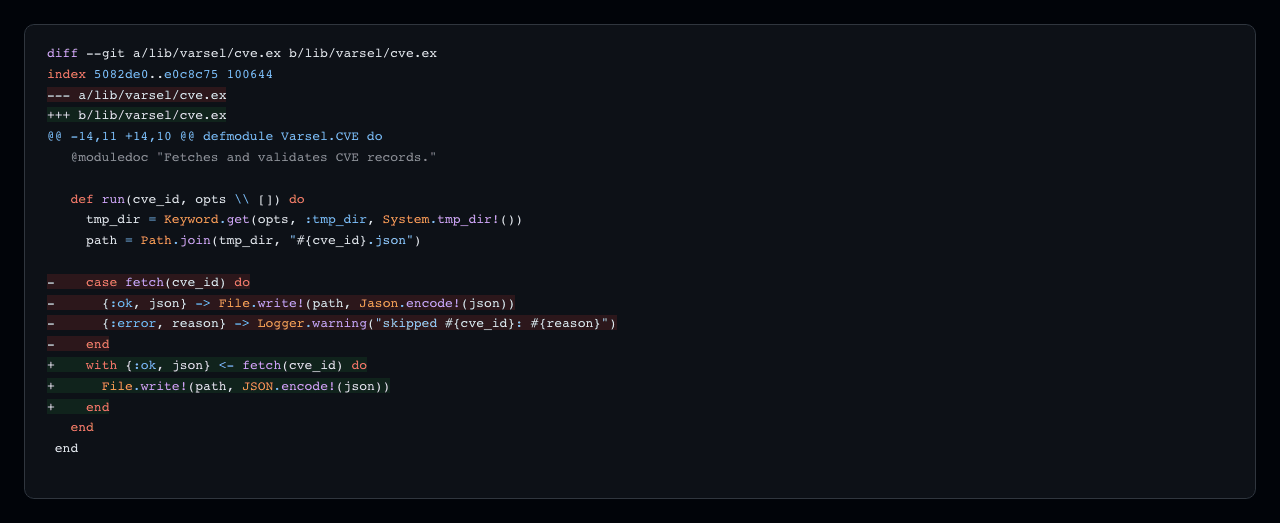
Which language a hunk gets
From the +++ path, matched against the same file name globs that
lumis languages list reports, so +++ b/lib/varsel.ex selects Elixir. A path
Lumis has no language for, including /dev/null, leaves the hunk uncoloured but
still marks its added and removed lines.
In the browser, load the inner language up front along with diff. A browser
cannot download a parser in the middle of highlighting, so a language first
named by a diff header has to already be loaded on the page. Node, the CLI, Elixir and
Rust load it on demand.
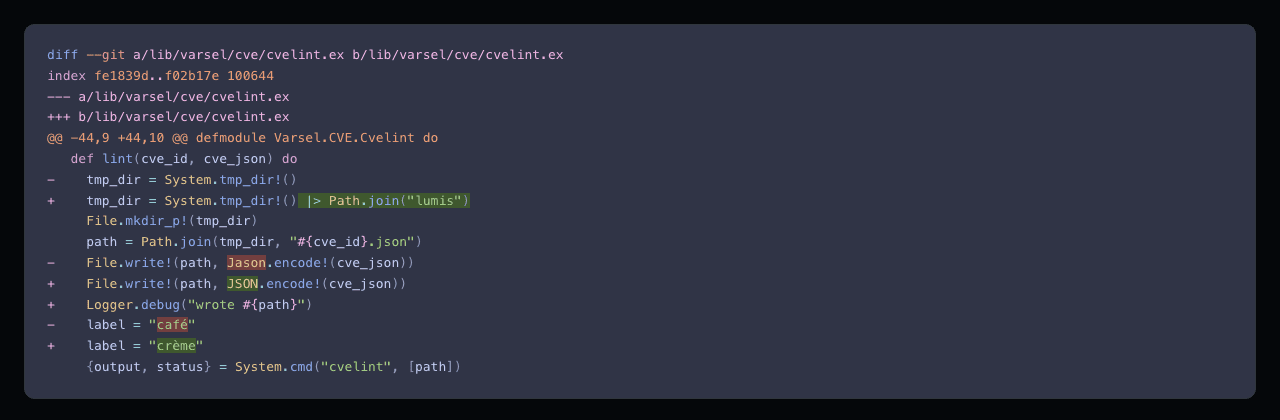
Mark the words that changed
A one-word edit to a long line is easy to miss when the whole line is green.
Turn on word diff and Lumis also marks the words that differ between the removed
lines and the added lines that replace them. It only works when the document is
highlighted with the diff language; any other language ignores the option:
const output = hl.highlight(
  source,
  htmlInline({language: diff, theme: frappe}),
  {wordDiff: true},
)
Input is ordinary diff text, the kind git diff, git format-patch, diff -u
and diff print.
Git's own --word-diff output doesn't work: its [-…-]{+…+} markers can't be
told apart from the same characters in code.
Each run of removed lines followed by added lines is compared line by line.
A removed line is paired with the added line it shares the most words with, in
order, and only when each keeps at least a third of its words. A line with no
such partner, like Logger.debug above, or one rewritten from scratch, marks
nothing beyond its line colour. A run over 1000 bytes on either side is left
unmarked, and comparing the rest counts against the highlight
budget.
Changed words take the theme scopes diff.minus.word and diff.plus.word, and
every built-in formatter styles them like any other scope. HTML linked writes the
l-diff-minus-word and l-diff-plus-word classes, which the bundled theme
stylesheets style. BBCode writes the scope's tag, such as [diff-minus-word-diff]
and [diff-plus-word-diff] in a diff document.
Every bundled theme defines both scopes. Neovim colorschemes have no colour for
changed words, so theme extraction derives one from the theme's diff.minus and
diff.plus: the same hue, a step lighter on a dark theme and darker on a light
one. A custom theme sets them like any other scope; without them, changed words
fall back to their line's diff.minus or diff.plus style.